
Monnit Edge - 06 BACnet
BACnet — expose Edge sensors to a BMS

This tab turns Monnit sensor messages into a BACnet/IP device your BMS (or YABE) can discover and read.
Lab wiring: the green Monnit - Edge - Sensor Simulator feeds fake readings into Monnit - BACnet Server (same JSON shape as live Edge).
Production: replace the simulator with iMonnit-Edge (see 03 iMonnit-Edge). Sensors must already be Online in the Edge UI (02 Path).
1. Big picture
  iMonnit-Edge (or Simulator)
        │  msg per sensor report
        ▼
  Monnit - BACnet Server  ──UDP 47808──►  BMS / YABE
- Each distinct sensor id automatically becomes BACnet object(s) when a message arrives — there is no allow-list.
- Live readings (and battery / signal / state) are read-only over BACnet.
- Optional writable objects (heartbeats / validated config) need Edge URL + login on the Network config so WriteProperty can call Edge SensorEdit.
2. Network config (do this first)
Double-click Monnit - BACnet Server → pencil beside Network.
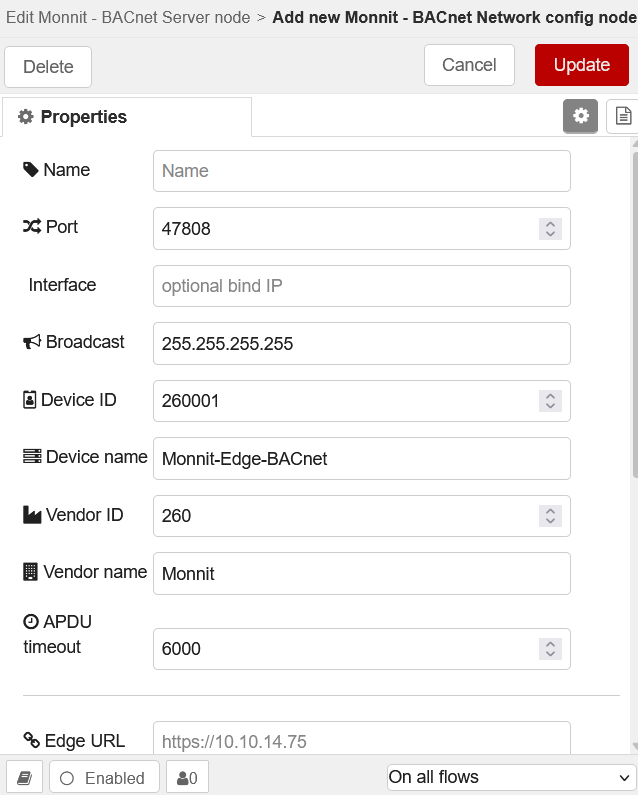
| Field | Suggested |
|---|---|
| Port | 47808 (UDP) |
| Interface | blank = all NICs, or this Edge’s LAN IP |
| Broadcast | usually 255.255.255.255 (but might be a specific IP) |
| Device ID | 260001 — must be unique on the BACnet LAN |
| Device name | e.g. Monnit-Edge-BACnet (what explorers show) |
| Edge URL | https://<edge-ip> — needed for Refresh + writable heartbeats/config |
| Edge user / Password | an Edge UI login |
| Verify TLS certificate | often unchecked in lab (self-signed) |
Save credentials correctly
- Fill Edge URL, Edge user, Password
- Click Test Edge login — wait for success
- Click Update on the config dialog
- Deploy the flow (credentials only persist after Deploy)
Skip Edge URL only if you only need local read-only objects from messages already wired into this node.
3. Monnit - BACnet Server node
Double-click Monnit - BACnet Server after the Network is saved.
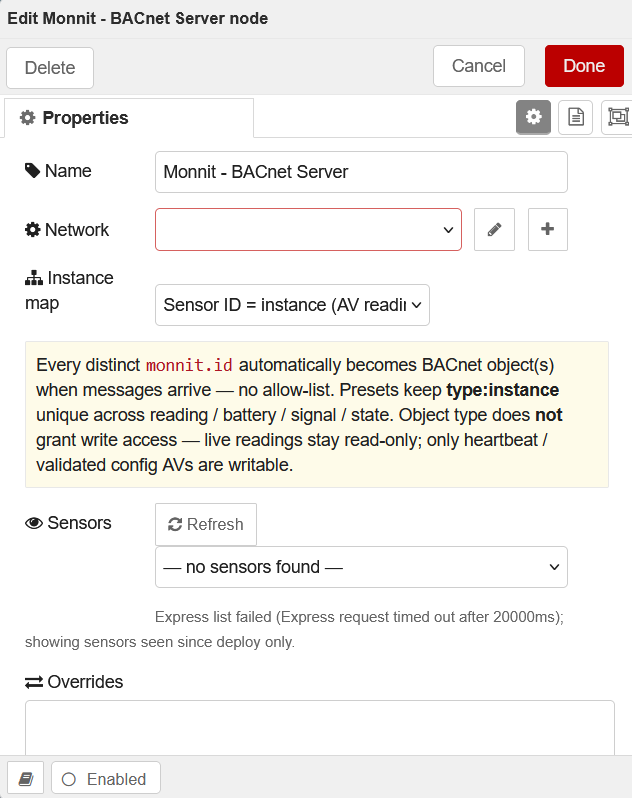
| Field | What it does |
|---|---|
| Name | Label on the canvas only |
| Network | The config from §2 |
| Instance map | How Monnit sensor ids become BACnet instances (see below) |
| Sensors + Refresh | Lists Edge sensors for optional overrides (does not create objects by itself) |
| Overrides | Optional: force sensor id → BACnet instance |
| Extra objects | Extra BACnet points created per sensor (see §4) |
| Download CSV / EDE | After sensors have reported — handoff file for the BMS engineer |
Instance map (pick one and stick with it)
| Option | Use when |
|---|---|
| Sensor ID = instance (AV reading, recommended) | Simplest: reading AV instance = Monnit id (e.g. sensor 1234 → AV:1234) |
| Convention AI readings (BMS-friendly) | Prefer Analog Input style for readings |
| Legacy AV offsets | Older maps; only for ids ≤ 2,097,150 |
Changing the map after a BMS is commissioned will confuse point lists — choose early.
4. Configuring which sensor points appear
You do not pick sensors one-by-one to “enable” them. Wire traffic in, Deploy, and objects appear when messages arrive.
A) Reading object (always)
When a message for sensor 1234 arrives, a reading object is created (name like Temperature-1234 ). Multi-channel sensors get additional instances for each channel.
B) Extra objects (checkboxes — global for all sensors)
| Checkbox | Creates | Writable? |
|---|---|---|
| Battery (volts) | Battery point for each sensor | Read-only |
| Signal (RSSI %) | Signal strength point | Read-only |
| Sensor state (BV) | Online / aware-style binary | Read-only |
| Heartbeat settings (writable AVs, seconds) | Sensor + Aware heartbeat AVs | Writable → Edge |
| Validated sensor configuration points | Catalog config points for supported apps | Writable → Edge |
This lab leaves Battery + Signal on. Turn on heartbeats/config when you want the BMS to change sensor settings over BACnet (requires Edge URL login from §2).
C) Optional instance overrides
- Deploy with Edge URL credentials saved
- Open Monnit - BACnet Server → Refresh under Sensors
- Pick a sensor from the dropdown or click + add
- Set Monnit sensor id → BACnet instance
- Done → Deploy
Empty Refresh? Missing Edge URL/login, wrong Network selected, or not Deployed yet. Without Edge listing, Refresh still shows sensors seen since last Deploy from wired traffic.
5. Walk-through (do this on the lab tab)
- Deploy this tab (simulator should start; BACnet status should go green / listening)
- Double-click Monnit - BACnet Server → confirm Network + Instance map = Sensor ID = instance
- Check Extra objects you want → Done → Deploy again if you changed them
- Wait for a few simulator ticks (or inject live iMonnit-Edge traffic)
- Optional: open the node → Refresh → confirm sensors appear in the list
- Optional: Download CSV or Download EDE for the BMS programmer
- Confirm discovery (next section)
Production cutover
- Delete or disconnect the simulator
- Wire iMonnit-Edge → Monnit - BACnet Server
- Confirm sensors are Online in Edge UI → Sensors
- Deploy → Refresh → verify objects in YABE / BMS
6. Confirm with YABE or Status
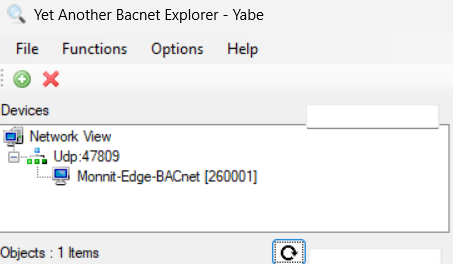
YABE (Yet Another BACnet Explorer) is a free BACnet explorer that will allow you to test the BACnet interface of the Edge Gateway. If the YABE host is on the same subnet as the Edge Gateway, it can be detected (otherwise you may need to manually add the Monnit Gateway as a Foreign Device [Functions > IP Services > Foreign Device Registration]).
| Check | What “good” looks like |
|---|---|
| Node status | Green / listening on 47808 (not a red error) |
| YABE | Discover → Device ID 260001 (or your Device ID) → open Objects → Present_Value updates |
| Debug | BACnet updates sidebar shows outbound activity (optional) |
| 09 Status | BACnet card RUNNING + Copy test from a PC |
Common issues
- Nothing in YABE — firewall/UDP 47808, wrong Interface/IP, Device ID clash, or flow not Deployed
- Device found, empty Object List — no sensor messages yet; wait for a report or check the wire into BACnet
- Refresh empty — Edge URL / Test Edge login / Update / Deploy sequence incomplete
- Cannot write heartbeats — Extra objects heartbeat checkbox off, or Edge credentials missing
7. Next
When BACnet reads look right, continue to 07 Modbus or use 09 Status for a support-style BACnet test without a full BMS.